


Subscriptions offer a recurring revenue stream, making them a highly effective monetization strategy for SaaS applications. This model encourages customer loyalty and provides a predictable income stream, allowing businesses to invest in product development and customer support. Additionally, subscriptions can often lead to higher customer lifetime value as customers are more likely to continue using a service they find valuable.
Lets Design a subscription Management system for a SAAS application.
We'll cover:
- Core features: Plans, billing, customer support.
- Stripe integration: Secure payments and easy management.
- Customer experience: Make it seamless.
- Analytics: Track performance and make data-driven decisions.
- Scalability: Build for growth.
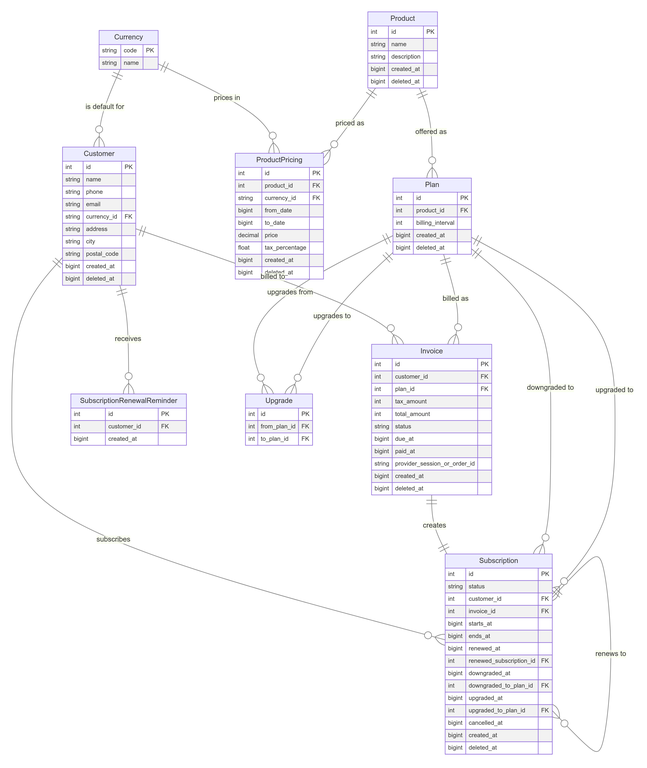
Database Schema Overview
Currency
It stores information about different currencies used in the system. Each currency has a unique 3-letter code and a name.
CREATE TABLE IF NOT EXISTS currency (code VARCHAR(3) NOT NULL PRIMARY KEY,name VARCHAR(320) NOT NULL);-- sample currency dataINSERT INTO currency (code, name) VALUES('INR', 'Indian Rupee'),('USD', 'United States Dollar'),('EUR', 'Euro');
Customer
It represents individual customers or users of the system. It stores personal information such as name, contact details, and address. Each customer needs to specify a currency in order to carry out any subscription-related operation.
CREATE TABLE IF NOT EXISTS customer (id BIGSERIAL PRIMARY KEY NOT NULL,name VARCHAR(255) NOT NULL,phone VARCHAR(10) NOT NULL UNIQUE,email VARCHAR(255) UNIQUE,address VARCHAR(255),city VARCHAR(255),currency_id VARCHAR(3),postal_code VARCHAR(12),created_at BIGINT NOT NULL,deleted_at BIGINT,CONSTRAINT fk_currency_id FOREIGN KEY(currency_id)REFERENCES currency(code)ON UPDATE NO ACTION ON DELETE RESTRICT);
Only the name and phone fields are made mandatory (not null constraint) because this is the only information taken while registering a customer.
Product
It represents the products or services offered in the system. Each product has a name, description, and timestamps for creation and deletion.
CREATE TABLE IF NOT EXISTS product (id BIGSERIAL PRIMARY KEY NOT NULL,name VARCHAR(255) NOT NULL,description VARCHAR(1000),created_at BIGINT NOT NULL,deleted_at BIGINT);-- sample product dataINSERT INTO product (name, description, created_at)VALUES ('Product A', 'This is Product A description', EXTRACT(EPOCH FROM NOW())),('Product B', 'This is Product B description', EXTRACT(EPOCH FROM NOW())),('Product C', 'This is Product C description', EXTRACT(EPOCH FROM NOW()));
Product Pricing
It handles the pricing information for products. It allows for time-based pricing (from a start date to an end date) in different currencies, including tax information.
Constraint: There are no overlapping price intervals for the same product and currency. This means you can't have two different prices for the same product in the same currency during overlapping time periods.
CREATE TABLE IF NOT EXISTS product_pricing (id BIGSERIAL PRIMARY KEY NOT NULL,from_date BIGINT NOT NULL,to_date BIGINT NOT NULL,price NUMERIC(10, 3) NOT NULL,tax_percentage DOUBLE PRECISION NOT NULL,currency_id VARCHAR(3) NOT NULL,product_id BIGINT NOT NULL,created_at BIGINT NOT NULL,deleted_at BIGINT,CONSTRAINT fk_currency_id FOREIGN KEY(currency_id)REFERENCES currency(code)ON UPDATE NO ACTION ON DELETE RESTRICT,CONSTRAINT fk_product_id FOREIGN KEY(product_id)REFERENCES product(id)ON UPDATE NO ACTION ON DELETE CASCADE);CREATE EXTENSION IF NOT EXISTS btree_gist;ALTER TABLE product_pricingADD CONSTRAINT unique_price_in_interval EXCLUDE USING gist (product_id WITH =,currency_id WITH =,tstzrange(to_timestamp(from_date),to_timestamp(to_date),'[]') WITH &&)WHERE (deleted_at IS NULL);-- sample dataINSERT INTO product_pricing (product_id, from_date, to_date, price, currency_id, tax_percentage, created_at) VALUES(1, EXTRACT(EPOCH FROM TIMESTAMP '2024-01-01 00:00:00'), EXTRACT(EPOCH FROM TIMESTAMP '2025-03-01 00:00:00'), 1000, 'USD', 5.0, EXTRACT(EPOCH FROM NOW())),(2, EXTRACT(EPOCH FROM TIMESTAMP '2024-01-01 00:00:00'), EXTRACT(EPOCH FROM TIMESTAMP '2025-06-01 00:00:00'), 1500, 'EUR', 10.0, EXTRACT(EPOCH FROM NOW())),(3, EXTRACT(EPOCH FROM TIMESTAMP '2024-02-01 00:00:00'), EXTRACT(EPOCH FROM TIMESTAMP '2025-12-31 00:00:00'), 2000, 'INR', 18.0, EXTRACT(EPOCH FROM NOW()));
Plan
It defines subscription plans for products. Each plan is associated with a product and specifies a billing interval (e.g., monthly, annually).
CREATE TABLE IF NOT EXISTS plan (id BIGSERIAL PRIMARY KEY NOT NULL,billing_interval INTEGER NOT NULL,product_id BIGINT NOT NULL,created_at BIGINT NOT NULL,deleted_at BIGINT,CONSTRAINT fk_product_id FOREIGN KEY(product_id)REFERENCES product(id)ON UPDATE NO ACTION ON DELETE RESTRICT);-- sample dataINSERT INTO plan (product_id, billing_interval, created_at) VALUES(1, 1, EXTRACT(EPOCH FROM NOW())), -- plan for Product A (monthly)(2, 3, EXTRACT(EPOCH FROM NOW())), -- plan for Product B (quarterly)(3, 12, EXTRACT(EPOCH FROM NOW())), -- plan for Product C (yearly)(2, 6, EXTRACT(EPOCH FROM NOW())); -- plan for Product B (half-yearly)
Invoice
It records financial transactions related to customer subscriptions. It includes details such as tax amount, total amount, due date, and payment status.
CREATE TABLE IF NOT EXISTS invoice (id BIGSERIAL PRIMARY KEY NOT NULL,tax_amount INTEGER NOT NULL,total_amount INTEGER NOT NULL,status VARCHAR(7) NOT NULL,due_at BIGINT NOT NULL,paid_at BIGINT,customer_id BIGINT NOT NULL,plan_id BIGINT NOT NULL,-- checkout session id generated by Stripe client, or-- order id in case of Razorpayprovider_session_or_order_id VARCHAR(255),created_at BIGINT NOT NULL,deleted_at BIGINT,CONSTRAINT fk_customer_id FOREIGN KEY(customer_id)REFERENCES customer(id)ON UPDATE NO ACTION ON DELETE RESTRICT,CONSTRAINT fk_plan_id FOREIGN KEY(plan_id)REFERENCES plan(id)ON UPDATE NO ACTION ON DELETE RESTRICT,CONSTRAINT check_invoice_statusCHECK (status IN ('DRAFT', 'PAID', 'UNPAID')));
Subscription
It tracks customer subscriptions to specific plans. It manages the lifecycle of a subscription including start and end dates, renewals, upgrades, downgrades, and cancellations.
Constraint: A customer cannot have overlapping active subscriptions. This means a customer can't have two active subscriptions with overlapping time periods.
CREATE TABLE IF NOT EXISTS subscription (id BIGSERIAL PRIMARY KEY NOT NULL,status VARCHAR(9) NOT NULL,invoice_id BIGINT NOT NULL UNIQUE,customer_id BIGINT NOT NULL,starts_at BIGINT NOT NULL,ends_at BIGINT NOT NULL,renewed_at BIGINT,renewed_subscription_id BIGINT,upgraded_at BIGINT,upgraded_to_plan_id BIGINT,downgraded_at BIGINT,downgraded_to_plan_id BIGINT,cancelled_at BIGINT,created_at BIGINT NOT NULL,deleted_at BIGINT,CONSTRAINT fk_customer_id FOREIGN KEY(customer_id)REFERENCES customer(id),CONSTRAINT fk_downgraded_to_plan_idFOREIGN KEY(downgraded_to_plan_id) REFERENCES plan(id)ON DELETE SET NULL,CONSTRAINT fk_invoice_id FOREIGN KEY(invoice_id)REFERENCES invoice(id),CONSTRAINT fk_renewed_subscription_id FOREIGN KEY(renewed_subscription_id)REFERENCES subscription(id)ON DELETE SET NULL,CONSTRAINT fk_upgraded_to_plan_id FOREIGN KEY(upgraded_to_plan_id)REFERENCES plan(id)ON DELETE SET NULL,CONSTRAINT check_subscription_statusCHECK (status IN ('INACTIVE', 'ACTIVE', 'UPGRADED')));CREATE EXTENSION IF NOT EXISTS btree_gist;ALTER TABLE subscriptionADD CONSTRAINT unique_subscription_in_interval EXCLUDE USING gist (customer_id WITH =,tstzrange(to_timestamp(starts_at),to_timestamp(ends_at),'[]') WITH &&)WHERE (deleted_at IS NULL AND status = 'ACTIVE');
Upgrade
It defines upgrade paths between different plans. It shows whether moving from one plan to another is an would be considered an upgrade or downgrade.
CREATE TABLE IF NOT EXISTS upgrade (id BIGSERIAL PRIMARY KEY NOT NULL,from_plan_id BIGINT NOT NULL,to_plan_id BIGINT NOT NULL,CONSTRAINT unique_plan_pair UNIQUE (from_plan_id, to_plan_id),CONSTRAINT fk_from_plan_id FOREIGN KEY(from_plan_id)REFERENCES plan(id)ON UPDATE CASCADE ON DELETE CASCADE,CONSTRAINT fk_to_plan_id FOREIGN KEY(to_plan_id)REFERENCES plan(id)ON UPDATE CASCADE ON DELETE CASCADE);-- sample dataINSERT INTO upgrade (from_plan_id, to_plan_id) VALUES (2, 4);
Subscription Renewal Reminder
It keeps track of renewal reminders sent to customers for their subscriptions.
CREATE TABLE IF NOT EXISTS subscription_renewal_reminder (id BIGSERIAL PRIMARY KEY NOT NULL,created_at BIGINT NOT NULL,customer_id BIGINT NOT NULL,CONSTRAINT fk_customer_id FOREIGN KEY(customer_id)REFERENCES customer(id)ON UPDATE CASCADE ON DELETE CASCADE);
Stripe Workflow

Setting up Stripe account for handling payments
- Create a Stripe account (if not already created) at https://dashboard.stripe.com/register.
- Fill in your details and verify your email to finish creating the account.
- You can begin using your Stripe account in test mode as soon as create it.
- In test mode, you can simulate using all of Stripe’s features without moving real money.
- After you activate your account, you can accept payments, create additional accounts, start a team, and set up a custom email domain.

- Stripe authenticates your API requests using your account’s API keys.
- If a request doesn’t include a valid key, Stripe returns an invalid request error.
- If a request includes a deleted or expired key, Stripe returns an authentication error.
- Visit the developers dashboard at https://dashboard.stripe.com/test/apikeys to create, reveal, delete, and roll API keys.

These keys as used in your application when using Stripe client.
Use the required Stripe SDK in your app as per the app’s requirements at https://docs.stripe.com/sdks.
Setting up Stripe Checkout Session
A Checkout Session represents your customer’s session as they pay for one-time purchases or subscriptions through Checkout or Payment Links. We create a Checkout Session on our server and redirect to its URL to begin Checkout.
Follow the documentation at https://docs.stripe.com/api/checkout/sessions/create to set up session creation in your app.
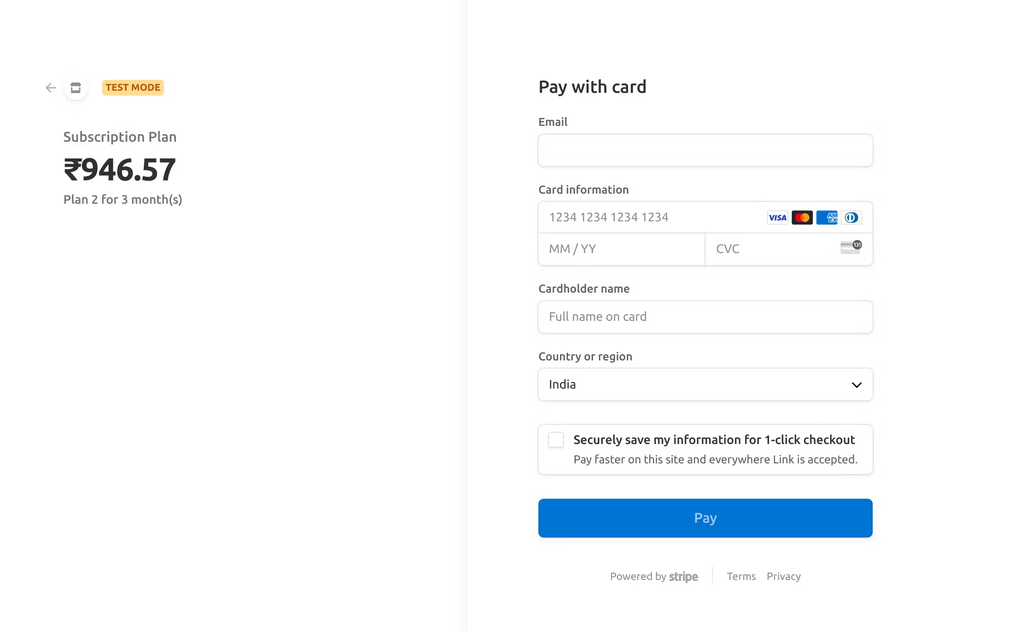
In our case, we follow the following configuration when creating a session
{payment_method_types: ['card'], // payment methods can be modified according to requirementsline_items: [{'price_data': {'currency': customer.currency.code, // currency code in lowercase'product_data': { // can be modifed as per requirements'name': 'Subscription Plan','description': f'Plan {plan_id} for {billing_interval} month(s)',},'unit_amount': total_amount, // in smallest currency units},'quantity': 1,}],mode:'payment',// provide frontend payment success or failure URLs (can be set as any dummy name while testing)// these are the URLs to where the page will be redirected in case of payment success or cancellation/failuresuccess_url: '<FRONTEND_URL>/success',cancel_url: '<FRONTEND_URL>/cancel',}
- The created Session object has an URL for the Checkout session.
- Redirect customers to this URL to take them to Checkout.
- If you’re using Custom Domains, the URL will use your subdomain.
- Otherwise, it’ll use checkout.stripe.com. This value is only present when the session is active.
Read More:
Delight Your App Users with Customized User Preferences
Case Study: Revolutionizing Scent Marketing’s CRM with Frappe


